Tuning Your Radar
Dial in optimal radar performance
Once upon a time, radars were strictly the purview of large commercial ships and the military. I'm pleased to say that today, far more advanced radar units can be found to fit even small runabouts. And I promise that once you try one and get comfortable with it, you'll never want to operate a boat without radar again. Not only does radar provide one of the most accurate means of navigation in any visibility, it cannot be matched for its assistance to collision avoidance.
Most current radars automatically tune themselves. However, conditions change and you should be aware of how to optimize your receiver for the ultimate picture of your surroundings.
How Radar Works
First, a quick note on how a radar works. Just as a depth sounder sends an electronic signal through the water and measures the time delay until its return, so does a radar. We know that the high-frequency signal (commonly called a microwave) travels at the speed of light through the air. So the time it takes for the signal to return can be computed into distance for the range read out. And since the radar unit knows in which direction the very focused signal was broadcast as the antenna turned, it can tell which direction the signal returns from — called bearing. Put these two functions together and you have a remarkably accurate view of the world around you.
If you purchase a radar, remember three things:
1) Move the display around your helm station until you find a place that is both easy to see and to reach so pushing buttons underway isn't a frustrating exercise.
2) Make certain it is not near your electronic or magnetic compass as the magnetron that generates the signal puts out an awesome electro-magnetic field. Most radars have a plaque on the back saying just how close to sensitive instrumentation it can be mounted.
3) It will do you no good to splurge on a 48-mile radar if you own a 26-foot center console. Like a VHF radio, radar works on line of sight (though the microwaves do curve slightly around the earth for those of you who might be physics nerds).
However, the rule of thumb for the attainable range on any given vessel is 2.2 times the square root of the antenna height in meters (2.2 times Antenna height/meters = Range). This will give you the maximum distance at which your radar will work. If you can only see a radar horizon of eight miles, a 48-mile radar qualifies as overkill — and overspend.
Turn On
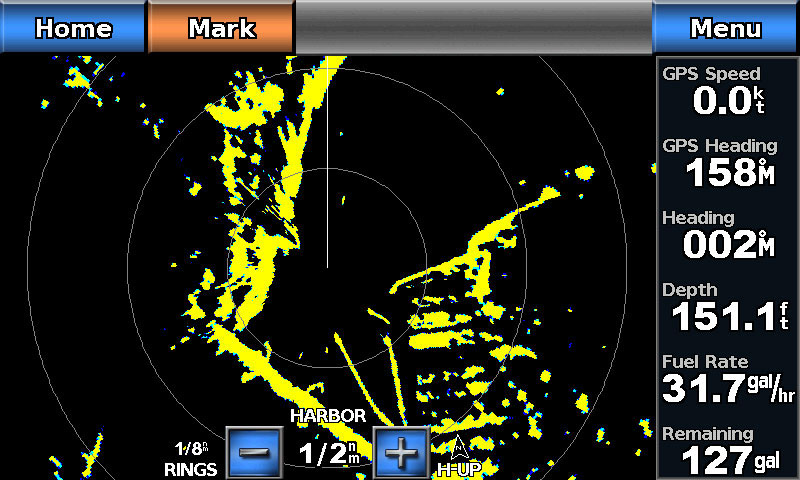
Despite the auto-tuning ability, all radars still have manual controls to fine-tune for specific conditions. When you first turn on your radar and it warms up, before tuning, set the range to at least eight miles so the tuning will be optimum for both higher and lower scales. Then, when close inshore, use a short range such as 1/4 or 1/2 mile. Offshore, logically, adjust your range for higher scale.
Brilliance
As you might surmise, Brilliance adjusts the display's brightness. Liquid Crystal Display models also have a contrast control. Though I've never found it particularly useful, most LCD radars (and some color CRT models) now have night-time viewing mode that reverses the colors of the display — making the bulk of the screen dark and the targets bright — ostensibly to protect your night vision. Adjust the brilliance to your own comfort level, much like the dash lights on your automobile.
Gain
Gain adjusts the sensitivity of the radar. Setting the gain to high allows you to receive weak echoes (return signals) that you might otherwise miss. However, too much gain turns the screen to a mass of speckles and blots out all returns. For optimum viewing, adjust the gain up until the speckles appear, then back it off just until they disappear and that will be optimum gain. Be aware that some offshore fishermen adjust the gain up higher to pick up flocks of birds feeding on the water's surface at long distances — a condition meaning fish are directly below. A/C Sea
Often when the unit first powers up you see a large splotch of return around the center of the display — right where your vessel is represented. You can thank the waves around your boat for this phenomenon known as sea clutter. A/C Sea means Anti-Clutter Sea and should be adjusted down just until the bulk of the sea clutter mass disappears. Adjust it down too far and you'll lose any close-aboard contacts such as other vessels, buoys and the like. This can also be an automated function on may units.
A/C Rain
Rain and snow appear as hazy cloud blobs on the display screen. Though most units automate this function as well, the ability to manually adjust this is critical. Most captains prefer to go around squalls if possible. With radar, you can see a squall while it's still miles away. Determine its direction and speed and plot your course accordingly to avoid it. Then, when you no longer want it represented on the screen, tune it out with Anti-Clutter Rain.
Fast Time Constant
This is an additional, automatic anti-clutter function that eliminates rain and sea returns and should only be used in the worst circumstances. Be sure to increase your gain a touch if you turn this function on or your target returns will be diminished somewhat.
Interference Rejection
This, too, is most often automated. Radar picks up the signals from any other radars in proximity and the signals show up as broken or dotted lines all over the screen. INT can be left on automatic all the time, though while offshore in poor visibility, you can often be forewarned of another vessel in the area even before you get a return echo from it if it happens to be using radar. A useful advance warning system, especially if that other vessel happens to be a hughe, unwieldy ship with a powerful radar.
Echo Stretch
While not an adjustment, this function can be turned on and off to enhance very small echoes, making them appear larger than they are. Don't leave this function on all the time either as it can be misleading.
To get used to your radar unit, I suggest you use it in daylight with good visibility for a while. Compare what you see on the radar with what you see with your eyes and you'll quickly be able to discern what's what on the screen alone.